
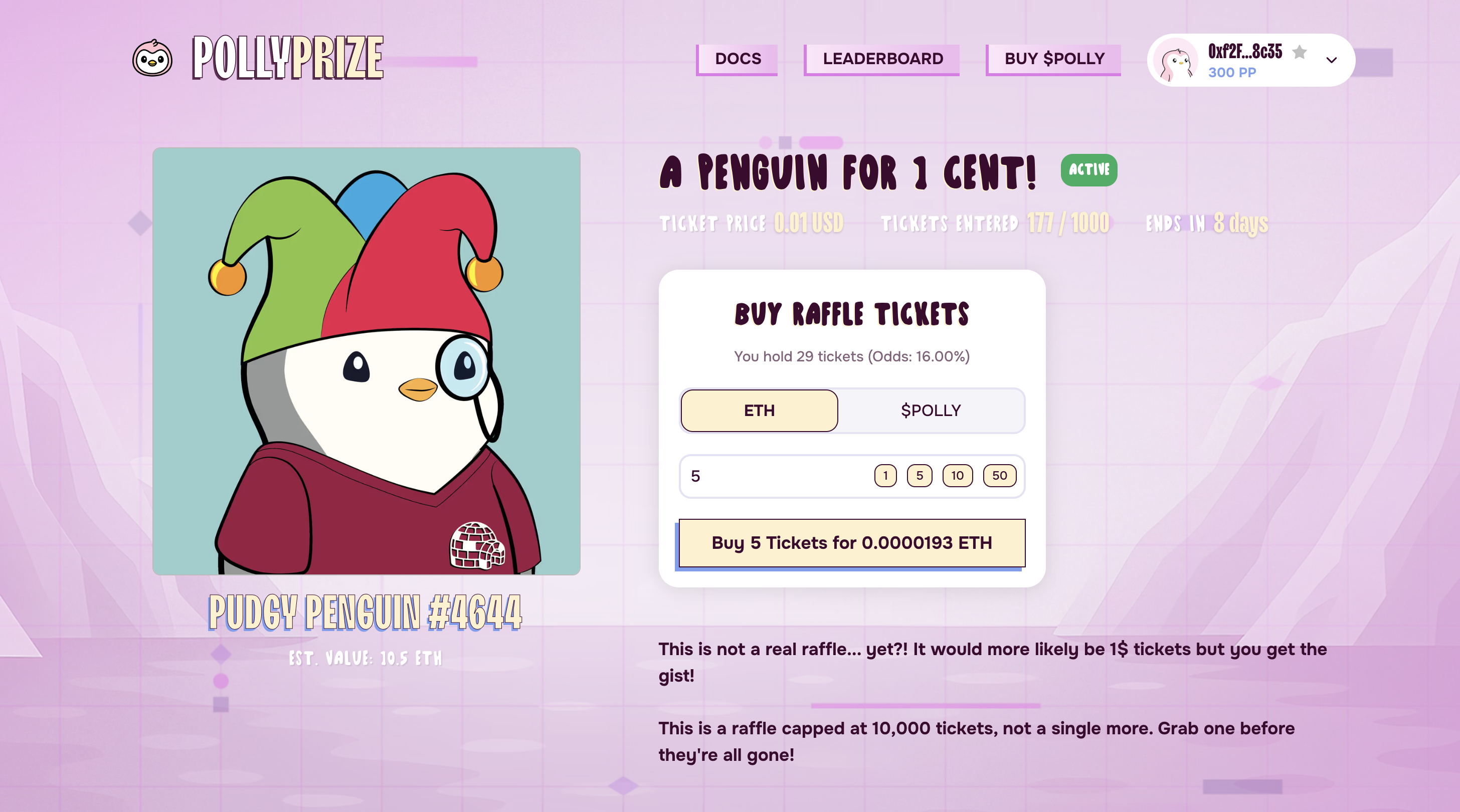
- Raffle Title & Status: Clearly displays the raffle name and its current status (Active, Ended, etc.) using the status pill.
- Prize Information:
- Image/Visual: A larger view of the prize.
- Name & Description: Detailed information about the prize (e.g., NFT collection name and ID, token amount and name).
- Estimated Value: May show an estimated value in ETH or USD (Note: this is often an estimate based on recent market activity and can fluctuate).
- Entry Information:
- Ticket Price: Clearly states the cost per ticket and the required currency (ETH, $POLLY, $USDC, PP) or indicates if it’s a Free Entry raffle.
- Your Tickets & Odds: If connected, shows how many tickets you currently hold and your calculated odds based on the total tickets entered so far.
- Total Tickets Entered: The current number of tickets in the pool.
- Entry Requirements (Gating):
- If the raffle has specific entry requirements (like holding an NFT, a minimum token balance, VIP status, or PP level), they will be listed here. Make sure you meet these before trying to enter. Learn more about Gating Types.
- Raffle Rules & Timing:
- Start Time: When the raffle began accepting entries.
- End Time / Countdown: When entries close. Raffles might remain active slightly past the end time if a “Soft Cap” (minimum tickets) hasn’t been met yet.
- Max Tickets Per Wallet: If there’s a limit on how many tickets one person can buy.
- Ticket Caps (Soft/Hard): Explains if there’s a minimum number of tickets needed for the draw (Soft Cap) or a maximum number of tickets available (Hard Cap). Learn more about Timing & Caps.
- Interaction Panel: (Only visible if the raffle is ‘Active’ and you’re connected)
- Currency Selection: Choose how you want to pay (ETH, Accepted Token, PP, Free Claim).
- Ticket Amount Input: Enter the number of tickets you wish to purchase.
- Cost Calculation: Shows the estimated cost based on your selection and the number of tickets.
- Bonus Preview: May indicate if you qualify for batch or VIP bonuses.
- Approve Button: Appears if you choose to pay with an ERC20 token ($POLLY, $USDC, etc.) and haven’t approved the contract to spend that token yet. Learn more about Approving Tokens.
- Buy/Enter Button: Click this to submit your transaction to the blockchain.